Coming soonYour AI agent can attend meetings for you. See how →

Flonnect
Home
  • Screen Recorder
    Record your screen in up to 1080p
    Meeting Copilot
    AI-powered transcription & summaries
    Meeting Agent
    Invite the AI agent to any meeting
    Interactive Demo Capture
    Create interactive product demos
    Testimonials
    Collect and showcase testimonials
    Presentation Recorder
    Record slides with your camera
    Bug Reporting
    Report bugs with visual context
  • AI Video Generator
    AI Video Editor
    AI Animated Video Maker
    AI Text To Video
    AI Avatar Video
    AI Face Swap Video
    AI Short Video Creator
    AI Image Generator
    AI Photo Editor
    AI Art Generator
    AI Background Remover
    AI Ad Generator
    AI Social Media Post
    AI Thumbnail Generator
    AI Presentation Maker
  • Meeting Recording & Collaboration

    Google Meeting RecorderMicrosoft Teams RecordingZoom Meeting Recording

    Content Generation & Documentation

    Minutes of MeetingTranscription

    Screen & Camera Recording

    Screen RecordingScreen + Camera RecordingPresentation RecordingVideo PresentationCamera Recording

    Specialized Recording & Enhancement

    Annotation While RecordingStep RecorderHTML Interactive Demo RecordingSystem Audio RecordingMic RecordingMovable Camera

    Sharing & Integration

    Share Video with One ClickReact/Comments on VideosUpload Video to YouTubeAttach Video in Email

    Bug Reporting & Development Workflow

    Screenshot Bug ReportingVideo Bug RecordingPush to JiraBug CaptureAdd Video in Bitbucket/GitHub PR
    View all features →
  • Education & Learning
    5 use cases
    Business & Corporate
    5 use cases
    Marketing & Content
    5 use cases
    Freelance & Creative
    7 use cases
    Technology & Development
    5 use cases
    Gaming & Entertainment
    3 use cases
    Legal & Compliance
    4 use cases
    Healthcare & Wellness
    4 use cases
    Finance & Investment
    3 use cases
    Research & Science
    3 use cases
    Manufacturing & Industry
    3 use cases
    Real Estate & Property
    2 use cases
    Automotive & Transportation
    2 use cases
    Community & Public Service
    4 use cases
    View all resources →
BlogsPricing
  • Extract Audio
    Remove Meta Data
    Change Container
    Inspect Streams
    Trim / Split
    Subtitles
    Batch Processing
    File Compression
    Convert to HLS
    Thumbnail Generator
    Rotate / Flip Video
    Audio Converter

Flonnect Capture: Turn Any Process into a Step-by-Step Guide

Click through the task once. Flonnect takes the screenshots and writes the steps, and you share the guide as a link.

Add Steps Recorder to ChromeOpen Flonnect

Free to start. Runs in Chrome.

Writing down how to do something takes longer than doing it. You take screenshots, crop them, paste them into a doc and describe each click. Flonnect Capture does that part for you: you click through the process once and it builds the step-by-step guide.

What is Flonnect Capture?

Flonnect Capture is a step recorder in the Flonnect browser extension and desktop app. While you work, it takes a screenshot of each step and writes a short instruction for it. The result is a step-by-step guide for a process, procedure or task that you can edit and share.
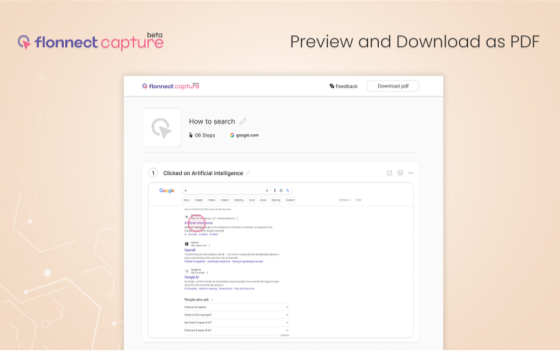
StepCapture2

The Benefits of Flonnect Capture

1. Save Time

You no longer have to take and annotate screenshots by hand. Capture records each step as you go, so a guide is ready when you finish the task, not an hour later.

2. Fewer Repeat Questions

If colleagues keep asking you how to do the same things, record the process once and send them the guide. They get an answer they can follow at their own pace, and you get fewer interruptions.

3. AI-Written Steps

Flonnect Capture uses AI to describe each step for you. Use it to onboard new employees, write training manuals or build tutorials. Click the button, do the task, and the guide is written.

4. Customization

You can change any of the AI-generated titles and text. Add tips, annotate screenshots and blur anything sensitive before you share the guide.

5. Easy Sharing

Share a guide with a link, embed it in your documentation or wiki, or export it as a PDF. You can also turn a guide into a video.

How to Use Flonnect Capture

Three steps from process to shareable guide:

  • Capture Any Process: Click the Flonnect Capture button and go through the process in your browser or on your desktop.
  • Edit Your Guide: Review the screenshots and text, and change anything you need.
  • Share It: Send the link, embed the guide or export it as a PDF.

Use Cases for Flonnect Capture

Six kinds of documents teams make with Flonnect Capture:

1. How-to Guides

  • Create step-by-step how-to guides for tasks and processes.
  • Help team members get through procedures with many steps.

2. Standard Operating Procedures (SOPs)

  • Document your organization's procedures and workflows.
  • Make sure everyone does the task the same way.

3. Software Documentation

  • Generate documentation for software applications.
  • Give users clear instructions for each feature.

4. Training Manuals

  • Build training manuals for onboarding new employees.
  • Give every new hire the same instructions from day one.

5. User Guides

  • Create guides that help customers use your product or service.
  • Add troubleshooting tips for common problems.

6. Job Aids

  • Make quick job aids for everyday tasks.
  • Give employees a reference to check instead of guessing.

Flonnect Capture turns the process you already know into documentation your team can follow. Install the Flonnect extension or desktop app and record your first guide for free.

Document it once. Share it forever.

Capture your first guide in a couple of minutes.

Add Steps Recorder to ChromeOpen Flonnect

Free to start. Runs in Chrome.

Logo

One screen recorder for work, demos & meetings.

✔ Screen recording✔ Meeting recording✔ Interactive demos✔ AI video editing
Windows
macOS
Chrome
Logo

One screen recorder for work, demos & meetings.

  • ✔ Screen recording
  • ✔ Meeting recording
  • ✔ Interactive demos
  • ✔ AI video editing

Product

  • Screen Recorder
  • Meeting Recorder
  • Meeting Agent
  • Presentation Recorder
  • Bug Reporting
  • Interactive Demos
  • Transcription
  • Pricing

AI Tools

  • AI Video Generator
  • AI Video Editor
  • AI Presentation Maker
  • AI Image Generator
  • AI Thumbnail Generator
  • Text to Video

Use Cases

  • Business Teams
  • Education
  • Marketing
  • Developers & QA
  • Sales & Support
  • Content Creators

Company

  • About Us
  • How It Works
  • Downloads
  • Community
  • Changelog
  • Contact Us
  • Compare

Legal

  • Privacy Policy
  • Terms & Conditions
  • Refund Policy
  • Google API Disclosure

Media Tools

  • Extract Audio
  • Remove Meta Data
  • Change Container
  • Inspect Streams
  • Trim / Split
  • Subtitles
  • Batch Processing
  • File Compression
  • Convert to HLS
  • Thumbnail Generator
  • Rotate / Flip Video
  • Audio Converter
Download for Windows
Download for macOS
Chrome Extension

© 2026 Talky Media Private Limited. All rights reserved.

Privacy
Terms
Refunds